
1: Remove Cartridge2: Unplug the AC Power Cord
3: Hold down the RESUME button
4: Release RESUME after plugging in the AC Power cord.
5: Press the RESUME once within
5 seconds and release the RESUME .
6: Press and HOLD RESUME for two seconds or more and release it.
7: Press and HOLD RESUME for two seconds or more and release it.
8: Unplug AC Power Cord to set data.
Tuesday, June 29, 2010
Waste Ink Tank Reset Procedures Canon BJC 1000 Series

Sunday, June 27, 2010
error 21000068 Epson T50 or Epson T60
Get an error 21000068 when resetting your Epson T50 or Epson T60 and not see any solution to prevent the problem. Why not try this tips, but reset this method not recommended for beginner user and you must understand what you are doing. These tips from Jagdish Rathore (India) and I have been granted permission to publish on this blog. He also has been publishing this reset method on his blog on: http://www.epsonservice.blog.com/. If you do not have any knowledge about PCB and electronics, I recommend don’t try this reset methode.
Here the reset method from Jagdish Rathore:
- Turn off printer and open printer.
- Open your Epson main PCB board. You can view an 8 pin CMOS IC. That is Epson waste ink counter IC and found on all Epson Printer.
- You can reset your printer without any resetter by following these ways.
- Soldering pin no 1,2,3,4 by wire as show in PICTURE and now turn on printer for ”20 second”
- After 20 second turn off printer and remove soldering wire from pin no. 1,2,3,4 ( back in original condition)
- Now turn on your printer
- And now your printer will be RESET
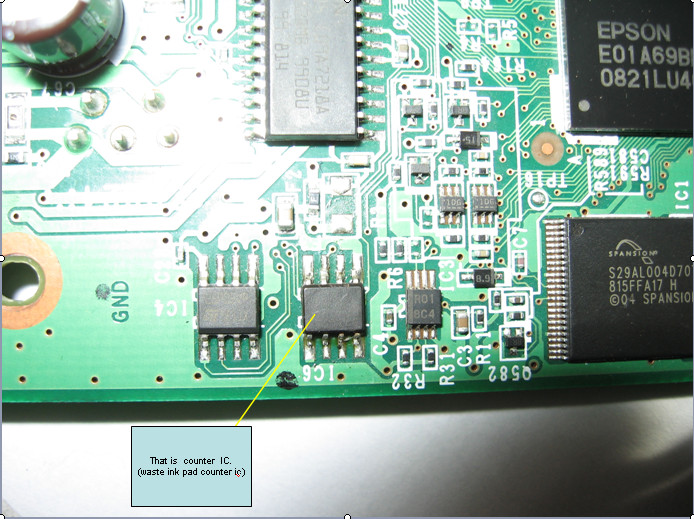

Note: This method is not recommended for beginners so you have to understand what you are doing. All problem caused by this tutorials is not our responsibility. Use this tutorial as your own risk.
Wednesday, June 23, 2010
do it Reset Epson C90 by your self
I. The Methods how to Reset Epson C90:
a. Surely your printer joined to computer,turn on printer.
b. Ekstrak resetter C90.
c. See folder resetter_epson_c90. turn reset.bat, change date be
10/07/2007.
d. Minimize command prompt reset.bat.
e. Turn “AdjProg.exe”.
f. Klik “Accept”.
g. Klik “Particular adjustment mode”.
h. Then choose Waste Ink pad Counter OK.
i. Klik button “Check”, till process finish.
j. Klik button “Initialization” then klik “Finish”.
k. Power off printer, then turn on .
l. If success, come back to command prompt reset.bat. Change date
as usual.
m. Surely printer C90 normally, test print.
stylus photo C90 Verion Indonesia download
stylus photo C92 Version Singapore download
Sunday, June 20, 2010
way to reset Canon MP190
Reset Waste Ink full canon
1) Enter SERVICE MODE. By pressing Menu Copy Scan Copy Copy
2) Select TEST MODE.
3) Select [8] PRINTER TEST in TEST MODE.
4) Select 3. [EEPROM CLEAR].
5) Select 0. [INK COUNT].
6) Press the [Set] key.
7) Press the [Stop/Reset] key (returning to the state of
3)), and then press the [ON/OFF] key
Thursday, June 17, 2010
Resetter Canon iP 1200, 1300, 1600, 1800, 1880, 2200, 2500
Resetter Canon iP 1200, 1300, 1600, 1800, 1880, 2200, 2500
reset Ink Counter
Reset Waste Ink Counter
Print Head Cleaning
Cleaning
Dry Level
Change Model
EEPROM Operationand Print Head Test
iP Tool : Download
EEPROM Printer Canon ip6210D/6220D/MP170/MP450/2200/ip600 Download
MPTool MP150/MP160/MP170/MP180/MP450/MP460 Download
Subscribe to:
Posts (Atom)