Showing posts with label Epson Stylus. Show all posts

Sunday, June 27, 2010

error 21000068 Epson T50 or Epson T60

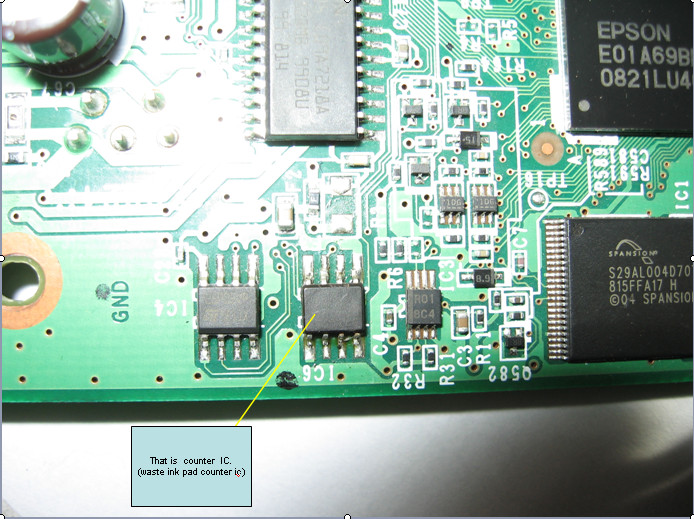
Get an error 21000068 when resetting your Epson T50 or Epson T60 and not see any solution to prevent the problem. Why not try this tips, but reset this method not recommended for beginner user and you must understand what you are doing. These tips from Jagdish Rathore (India) and I have been granted permission to publish on this blog. He also has been publishing this reset method on his blog on: http://www.epsonservice.blog.com/. If you do not have any knowledge about PCB and electronics, I recommend don’t try this reset methode.

Here the reset method from Jagdish Rathore:

  1. Turn off printer and open printer.
  2. Open your Epson main PCB board. You can view an 8 pin CMOS IC. That is Epson waste ink counter IC and found on all Epson Printer.
    step 1 T50 -T60 resetting
  3. You can reset your printer without any resetter by following these ways.
  4. Soldering pin no 1,2,3,4 by wire as show in PICTURE and now turn on printer for ”20 second”
    step 2 T50 -T60 resetting
  5. After 20 second turn off printer and remove soldering wire from pin no. 1,2,3,4 ( back in original condition)
  6. Now turn on your printer
  7. And now your printer will be RESET

Note: This method is not recommended for beginners so you have to understand what you are doing. All problem caused by this tutorials is not our responsibility. Use this tutorial as your own risk.

readmore..

Wednesday, June 23, 2010

do it Reset Epson C90 by your self

I. The Methods how to Reset Epson C90:
a. Surely your printer joined to computer,turn on printer.
b. Ekstrak resetter C90.
c. See folder resetter_epson_c90. turn reset.bat, change date be
10/07/2007.
d. Minimize command prompt reset.bat.
e. Turn “AdjProg.exe”.
f. Klik “Accept”.
g. Klik “Particular adjustment mode”.
h. Then choose Waste Ink pad Counter OK.
i. Klik button “Check”, till process finish.
j. Klik button “Initialization” then klik “Finish”.
k. Power off printer, then turn on .
l. If success, come back to command prompt reset.bat. Change date
as usual.
m. Surely printer C90 normally, test print.

stylus photo C90 Verion Indonesia download
stylus photo C92 Version Singapore download

readmore..

Thursday, June 10, 2010

Resetter manual for EPSON Stylus Color 400, 600 free download

EPSON Stylus Color 400, 600

Pressing and holding LOAD/EJECT and CLEANING buttons, press POWER button and hold it until You will see blinking INK OUT and PAPER OUT leds.
Release all buttons.
In 2-3 seconds time press and release LOAD/EJECT button.

EPSON Stylus Color 440, 640, 740, 460, 660, 670, 760, 860, 880, 1160

Pressing and holding LOAD/EJECT and CLEANING buttons, press POWER button and hold it until You will see blinking INK OUT and PAPER OUT leds.
Release all buttons.
In 2-3 seconds time press and hold CLEANING button, until all leds will blink.

EPSON Stylus Color 680

readmore..

Tuesday, June 1, 2010

Download Link Resetter Epson TX210

A visitor of this blog has given download link for adjustment program Epson TX210 or Resetter Epson TX210 but I have not tested this software because I don’t have the Epson TX210 printer. Epson TX210 is multifunction inkjet printer that can print up to 5760 x 1400 dpi. Some features of Epson TX210, built in access button for instant printing, copying and scanning. It also incorporated with a 1.5-inch LCD and multi-card slots providing comfortable printing even in the absence of a PC.

Here the screenshot of Resetter Epson TX210 or adjustment program Epson TX210

adjustment program epson TX210
Reset Counter epson TX210
Counter epson TX210

Download Link Resetter Epson TX210:

http://www.mediafire.com/?yzkzzlzdmnm

readmore..

Saturday, February 21, 2009

CX5500/5505 reseting

1. execute the adjustment program (printer must be ON)
2. choose maintenance ink pad menu
3. read
4. initialize
5. Read(again) after "0" press finish
6. choose set shipping data (bottom menu)
7. choose set
8. wait for a while (about 1 minute)
9. if there is a reaction from the printer (it will load some paper or you hear "glodak" sound), the reset process will be done. turn off the printer and then turn on again. repeat read the EEPROM
10. if there is no reaction from the printer, repeat step 1

readmore..

Manual Resetting Instructions for RX510, RX630 and CX6500 models

See big button on your printer like power on ( this is on the left side ), black & white, color, and then stop button ( these are on the right side).
1. first turn off your printer
2. push the b/w + color + stop ( or maybe ok button ) together and hold
3. push power on button and hold ( so you push 4 button together ) don't release all the button until you see the light indicator is blinking and then a message display on the lcd
4. release you finger from the button
5. push the color button ( once )
6. turn off the printer
7. turn it on again

readmore..

Reseting Instructions for Epson Printers

Note: This procedure is applicable for most Epson models except those models listed below.

1. Switch on printer
2. Set the Computer Date as indicated in .bat files preferably b4 extracting the file or run .bat. files
3. Use latest Izarc or winrar to unzip (www.izarc.org)
4. run adjprog.exe from the extracted folder(or look for the application file or .exe file then run it)
5. click accept
6. click particular adjustment mode
7. go to maintenance then Select waste ink pad counter then click ok
8. click on "check button" till its done then click on "initialization button" then click on "finish button"
9. switch off printer for 5secs then switch on again
10. Adjust the date to present.

if you got errors during reseting, maybe you didn't follow the above instructions carefully.

here is what to do.


Trouble Shooting instructions

1. delete the "adjustment program" folder from drive C:\ or from system drive
2. go to RUN type regedit then press enter
3. find the entry HKEY_LOCAL_MACHINE\SOFTWARE\EPSON\PTSG\ then delete it
4. repeat above resetting instructions


Other trouble shooting suggestions

1. delete the extracted folder (the unzipped reseter files)
2. change the date as indicated in indoreset.bat then extract again the zip or
rar file.
3. remove or uninstall duplicate printer copies coz it confuses the program
4. transfer in other USB ports

if this doesn't fix the problem try resetting the printer from another CPU or from another installed O.S.


Resetting Instructions for R240/R245/R250

1. Switch on printer
2. Set the Computer Date as indicated in indoreset.bat run indoreset.bat.
3. Use winrar to unzip
4. run adjprog.exe (or look for the application file or .exe file then run it) from the extracted folder
5. click accept
6. Set printer model then click ok
7. Select waste ink pad counter under maintenance option then click ok
8. Click read button
9. Click initialization then finish
10. Restart your printer


Resetting Instructions for CX1500

1. Switch on printer
2. then you have to run the program or .exe file.
3. Go to RD setting
4. Double Click on Dump Data Rom Data
5. Replace Protection Counter A to Zero (0)
6. Click Exit

readmore..